- Home
- Government
- Government Authentication Service
- How to create an account
How to create a Government Authentication Service account
Where to create your account
If you want to access a service that already uses the Government Authentication Service, you can create your account via the web page of the online service in question.
If you wish to create your account in advance of a possible transaction with the government, you can do so from the Access the service page.
Eligibility requirements
To create and use an account with the Government Authentication Service, you must:
- be 14 years of age or older and act on your own behalf.
- have a unique email address (this address can only be linked to one account).
In addition, to create your account and access online government services that require proof of identity, you will need to provide the requested documents or information.
Creating an account according to your needs
Step 1 - Create your account with basic authentication
This step enables you to create a basic authentication to access certain services that do not require additional identity verification.
Therefore, by completing only Step 1, you will have restricted access to some government services that use the Government Authentication Service, as you will not have completed the validation of your identity, which is essential to access certain online services.
To prove your identity and access all services, continue with Step 2.
Watch the video
Disclaimer: the video player is YouTube’s and may have some accessibility barriers. You can skip to the content after the video
Disclaimer: the video player is YouTube’s and may have some accessibility barriers. You can skip to the content before the video.
In this step, you will:
- Choose a user name.
- Enter your email address.
- Create a secure password.
- Validate the creation of your account with the unique six (6) digit code that you will receive at the email address entered.
Your account is now created.
Step 2 - Continue personalizing your authentication by proving your identity
This step enables you to access online services that require proof of your identity. By providing the requested proof of identity, you will be able to access other online services that require further validation of your personal information, thus ensuring that you are indeed the person requesting the requested services.
We recommend that you complete Step 2, even if the online service you wish to use does not require it, as you will be able to access a wider range of online services in the future by validating your identity.
Watch the video
Disclaimer: the video player is YouTube’s and may have some accessibility barriers. You can skip to the content after the video
Disclaimer: the video player is YouTube’s and may have some accessibility barriers. You can skip to the content before the video.
In this step, you must:
- Enter your personal information.
Prove your identity with certain official documents, including confidential codes.
Aide-mémoire
Documents required to verify your identity
Once you've chosen your username, you'll need four pieces of information to verify your identity:
- Your health insurance number
- Your social insurance number
- Your notice of assessment number (you can obtain an electronic copy of your notice by consulting
My Account via the Revenu Québec home page) - Reference number from your valid driver’s licence
or
reference number from your valid health insurance card
Watch the video
Disclaimer: the video player is YouTube’s and may have some accessibility barriers. You can skip to the content after the video
Disclaimer: the video player is YouTube’s and may have some accessibility barriers. You can skip to the content before the video.
Details of documents required
Here are the details of each of the documents required to prove your identity once your Government Authentication Service account has been created.

Your health insurance number can be found on the front of the health insurance card issued by the Régie de l'assurance maladie du Québec (RAMQ).
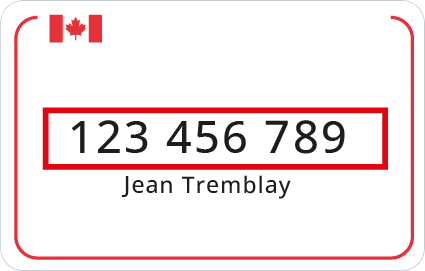
Your social insurance number can be found on the front of the card.

Your notice of assessment number must have been issued by Revenu Québec within the last two taxation years. This number begins with Q or M and includes 11 characters. You can obtain an electronic copy of your notice by consulting
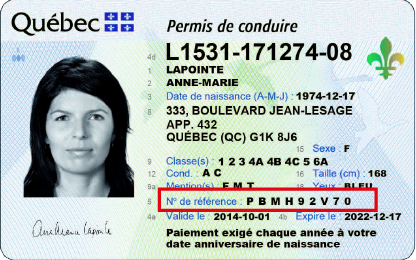
Your driver's licence reference number can be found on the front of the card issued by the Société de l'assurance automobile du Québec.

Your health insurance card reference number can be found on the back of the card issued by the Régie de l'assurance maladie du Québec (RAMQ).
If you don't have your notice of assessment number or if you don't have either of the two reference numbers:
Ask to receive a confidential code by mail when you enter the other required documents in the portal. The code will enable you to complete your identity verification.
To complete the identification process (Step 2), you can request a confidential code by mail by following these steps:
- When you are asked to enter your Notice of Assessment number, click on I do not have a Notice of Assessment or I do not have my Notice of Assessment on hand OR when you are asked to enter your health insurance card or driver's licence reference number, click on I do not have either of these pieces of information.
- Click on Next.
- Enter your postal address.
- You will then have to give your consent for the Ministère de la Cybersécurité et du Numérique to send your name and address to Revenu Québec, so that the latter can send you a confidential code by mail. To do so, please check the appropriate box.
You can complete the identification process when you receive your confidential code by logging on to the Government Authentication Service using your email address, password, and confidential code.
Please allow up to 15 days for your confidential code to be mailed to you after you have requested it.
Attention
This method will not verify your identity if your notice of assessment number and your two reference numbers are missing. Only one required piece of information can be replaced.
Special situations relating to identification requirements
Some clients may find themselves in special situations or unable to provide certain documents (e.g., military personnel, new arrivals, foreign workers and others).
Social insurance number
If you do not have a social insurance number:
- This information is required to create a Government Authentication Service account. To obtain a social insurance number, you must apply at
Service Canada .
Notice of assessment
If you do not have your notice of assessment or have not filed an income tax return for the last two tax years:
- If you have filed an income tax return, you can retrieve your notice of assessment via
Revenu Québec's online services . - If you have not filed a recent tax return, but your mailing address is valid, you can request a confidential code by mail during the account creation process. Once the code has been received, you can complete your account creation.
Health insurance card
If you have an expired health insurance card:
- If you have your expired card number on hand, you can use the Government Authentication Service.
- If you do not know your expired card number, you can contact the Régie de l'assurance maladie du Québec (RAMQ) at 418-646-INFO or 1-800-561-9749. By doing so, you will obtain your card number and be able to continue your registration for the Government Authentication Service.
If you have never had a Québec health insurance card and wish to obtain one, you must:
- verify your
eligibility for the Québec health insurance plan; - register by phone at 418-646-INFO or 1-800-561-9749, or
online if you are eligible for the plan.
Getting help
If you need help setting up your account, please contact us.
By phone
-
Monday to Friday, 8 a.m. to 6 p.m.
-
Toll-free: 1-877-644-4545
Authentication at the service centres of the Société de l’assurance automobile du Québec (SAAQ)
You can create a Government Authentication Service account at certain SAAQ service centre if you are in one of the following situations:
- You do not have all the necessary identification documents or information to complete the online process
- You are experiencing difficulties during the identity validation process
Last update: June 19, 2025