- Home
- Transports
- Traffic and road safety
- Traffic signs and signals
- Signs and signals in a roadwork zone
Signs and signals in a roadwork zone
When near a roadwork zone, you need to watch out for and pay attention to work signs and signals. Doing so will ensure the safety of both you and the workers.
There are several ways of informing you of construction, maintenance or rehabilitation work being carried out on or near public roads. Various strategies are also in place to make sure that users can get around safely.
Orange traffic signs
Orange road signs inform you of the presence of roadwork. In particular, they can indicate:
- the distance to be covered before reaching a work area
- the presence of a flag person directing traffic
- a change in speed limit from that normally posted
- an area temporarily closed to traffic
Temporary speed limits
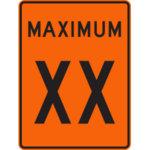
A temporary maximum speed limit may be necessary, given the configuration of the work zone and the presence of workers. In a roadwork zone, police surveillance is often reinforced. Fines are doubled when it comes to speeding in roadwork zones.
The maximum speed at which you are allowed to travel is indicated on an orange sign like this one.
Presence of flag persons
The following sign indicates the presence of a flag person to direct traffic. Note that this sign is the only one with flags to attract drivers’ attention.
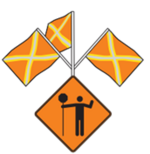
It means that traffic must be slowed, diverted or stopped temporarily because there are workers and work vehicles on the road. You must then follow the instructions of the flag person. It is important to show caution and respect for the flag persons.

Merging lanes
This sign is installed on the side of a public road when two lanes of traffic in the same direction are merged into one.
The sign below indicates that the left-hand lane is temporarily closed and that you must change lanes if you find yourself in it. You must therefore use the other lanes open to traffic.

Mobile photo radar
The following sign indicates that a nearby work zone may be monitored by mobile photo radar device. When present, it measures the speed of vehicles and takes photos of those exceeding the speed limit.

Diagonal arrow
This sign indicates the direction to follow in the vicinity of the construction site. The diagonal arrow is installed at the beginning of the taper that completely closes off a traffic lane. The sign can also indicate that a lane is narrowed.

Truck crossing
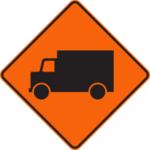
This sign indicates that a loaded truck can access the public road by leaving the access lane.
Road closed
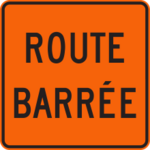
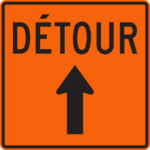
The following sign indicates that the road is closed to traffic. You must then follow the detour signs.
Presence of flag persons
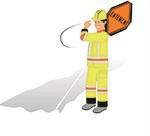
A flag person directs the movement of road users in roadwork zones. You can recognize them by their fluorescent yellow-green hard hats and clothing. In their presence, you must obey the following signals.
Order to stop
To ask you to stop your vehicle, the flag person raises their hand and uses an octagonal-shaped sign bearing the words “Arrêt” or “Stop”.

To ask you to stop, the flag person may also hold up an orange flag with a yellow X and raise their hand.

Order to slow down
To ask you to slow down, the flag person turns their octagonal-shaped sign to show an orange diamond bearing the word “Lentement” (“Slow”).

In cases where the flag person is using a flag, they will wave it up and down to ask you to slow down.

Order to move
To ask you to move ahead, the flag person motions to you, as shown in the image below. At this point, their sign or flag is placed to one side to avoid confusion.

Vehicle with rotating light
A yellow rotating light on a vehicle indicates to road users that the vehicle may:
- Impede traffic flow.
- Be travelling well below the speed limit.
- Be accompanying another vehicle whose maneuvers may be impeding traffic.
In the presence of such a vehicle, you must exercise special caution.
Traffic light arrow board
The traffic light arrow board indicates the presence of a work area and points you in the right direction when a lane is obstructed or closed. It is mounted on a vehicle or trailer.
Traffic control barrier
A barrier can be used to stop and move road users. It is remotely controlled by a flag person located outside the traffic lanes.
When the red light is activated, the barrier is lowered, exposing the flag to indicate that you should stop. When the yellow light is activated, the barrier is raised. You must then drive slowly.
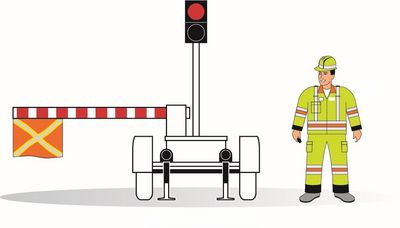
Barrier giving the order to stop
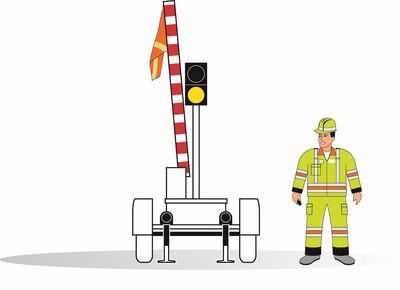
Gate giving the order to drive slowly
Reducing the impact of roadwork on traffic
Reducing the impact of roadwork on traffic remains a major challenge. Various strategies are being put in place to facilitate the mobility of road users during the construction period. These include:
- Work is carried out mainly in the evening, at night and on weekends, when traffic flow is reduced on the road network
- Designation of detour roads
- The use of shoulders to maintain the number of traffic lanes
- Construction of temporary overpasses to help maintain mobility on the highway system
- The use of portable guardrails to modify the number of traffic lanes more quickly, depending on traffic volumes
- The use of variable message signs to inform users of road obstructions and detour roads
- Installation of specific structures to maintain pedestrian and cycling connections
- Continuous broadcasting of information about road obstructions on Québec 511
- Improved public transit services, in collaboration with public transit companies
Posters on Québec road signs
The series of posters on Québec road signs (La signalisation routière au Québec) is available free of charge. These posters highlight the symbols and signs that have been used in the province for over 100 years.

Poster presenting roadwork signs
See also
Last update: July 13, 2026